1- LOGIN
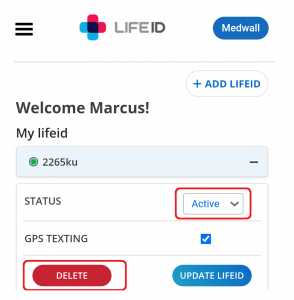
2- Click ‘ADD LIFE ID’
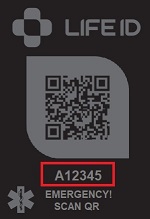
3- Type in the ‘LIFE ID CODE’ field in your profile the six-digit number/letter on your LIFE ID product faceplate
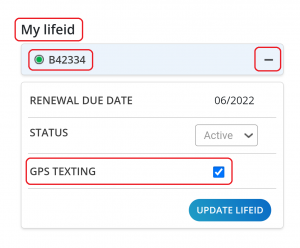
4- You can ‘Activate’ or ‘De-Activate’ GPS tracking from here
You can add and delete as many LIFE ID codes to your profile as you like. There are no limits. You do not need a duplicate code since each code is unique and needs to be added separately.
Your LIFE ID profile and its information are always saved and secure, even if there is no code attached to your profile.
Adding or deleting LIFE ID codes does not change the information within the profile.
You can temporarily de-activate your LIFE ID and activated when needed as well.
Nope. Adding or deleting LIFE ID codes does not change the information within the profile.
You can add or delete as many LIFE ID codes to your profile as you like. There is no limits to this function.
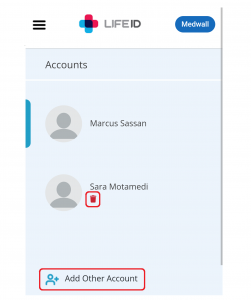
Yes. Click ‘Add Account’ on the left side of your profile dashboard and add friends or family members. You can edit information and activate LIFEID products for them.
You can now add and edit information for this person from your profile.
The additional profile icon will appear on the left side panel of your dashboard.
Nope! There is no subscription or other fees.
You can add and delete as many LIFE ID codes to your profile as you like. There are no limits. You can temporarily de-activate your LIFE ID and activate it when needed as well.
Absolutely. Anytime as many times as you would like. Simply log in to your LIFEID.health profile, click on the PROFILE INFO tab, and in the box below Medical Information, write the critical medical information you want to appear when your LIFEID is scanned.
Your Emergency Contact Information is visible to anyone who scans your LIFEID or enters your tag number using the URL. The information displayed on your LIFEID Bracelet, Helper, or Apple Sleeve is totally in your control and you can change the information as often as you like.
How does The Health Portability and Accountability Act (HIPAA) control the use and security of your health information?
HIPAA does not control your use of your health information. HIPAA grants you the legal right to view and access your legal health record. It is a set of federal rules designed for health care providers, health insurance companies, and other identified “covered entities” that control who can look at and receive your health information. HIPAA regulations also ensure that your privacy is protected to the greatest extent, with best practice policies and safeguards in place to minimize any exposure or misuse.
Must LIFE ID comply with HIPAA?
No, we are working on behalf of health care consumers who are exercising their legal right to obtain, aggregate, and use their health information. Because we are not what the federal government considers a “covered entity”, LIFE ID is not subject to HIPAA regulations.
Just because LIFE ID is not legally required to be HIPAA compliant does it still meet its security standards?
Yes! We respect your privacy and understand the importance of securing your information. Therefore we choose to meet the highest possible standards to earn your trust. We meet the technical, physical, and administrative safeguard requirements defined by the HIPAA Security Rule to be considered “safe” with regards to privacy protection for the LIFE ID Private Profile. The LIFE ID Public profile is designed to be shared in case of emergency and falls outside of HIPAA for this reason.
In addition to following HIPAA security recommendations, LIFE ID adheres to the FTC’s Security by Design Guidelines:
– Data security is carefully considered for each component of the LIFE ID platform
– Data is encrypted both in transit and at rest
– LIFE ID is protected from common vulnerabilities
– Our team stays current with knowledge of new vulnerabilities and keeps software appropriately updated
Start With Basic Information
- Add more info as needed to complete your profile
- Preview and adjust your information as many times as you like
- Click SAVE every time you update your information
TIP: You can check your daily medication schedule by scanning your LIFE ID
LIFE ID Mag Purple band operation video
MAG PURPLE VIDEO
LIFE ID Mag Orange band operation video
MAG PURPLE VIDEO
The physical location where your LIFE ID code is scanned or the location where your LIFE ID code was activated from LIFE ID website. A GPS location text message is sent to the emergency contacts in your LIFE ID profile. You can have multiple emergency contacts.
We take security seriously and hold all information you provide securely. We will never sell your account details (name, postcode, gender, DOB, and email address) to third parties.
The 6-digit LIFE ID code is how the QR code on your faceplate connects to your LIFE ID profile
Also, the code provides a second way of obtaining access to your Medwall through the FIRST RESPONDERS HERE portal
To see portal:
You can indicate DNR or similar things on your LIFE ID Medwall, however only hospital admins are legally bound to those terms, not EMT or first responders.
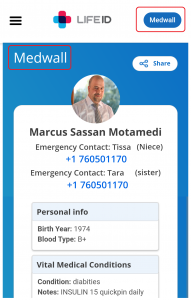
A MEDWALL is your ‘medical wall’ personal web page that is linked by the QR on your LIFEID product and immediately displays the CRITICAL medical information you choose to provide through your profile dashboard. When emergency personnel or anyone scans your LIFEID they immediately gain access to your CRITICAL information which you choose to make visible to them.
This information can make all the difference when you’re hurt and unable to answer questions yourself. YOU DECIDE what information you want to be displayed including emergency contacts and details on any medical conditions such as allergies, medications you’re currently taking, or conditions like asthma, autism, diabetes, Alzheimer’s, epilepsy, heart disease, COVID-19, “long COVID,”etc.
Yes. LIFE ID works all around the world in multiple languages. Wherever in the world there is internet your LIFE ID will work.
No worries!
Our policy on damaged LIFE ID (faceplate) is:
Please deactivate or delete the lost LIFE ID. Please email us with your LIFE ID code and login email information.
Lastly, provide us your shipping address so we can mail you a replacement which will arrive in 5 to 7 business days.
This applies only to the faceplate and not the entire product.
Note: You can add as many LIFE ID codes to your user profile as you wish.
LIFEID utilizes all web technology available to keep our customers safe. Your emergency contacts are alerted with a GPS text with the time and location every time your LIFEID is scanned.
You can opt-in for this FREE option through your profile dashboard. Click the LIFEID product you want to edit in your profile and click to activate or de-activate GPS texting.
Medical personnel and emergency responders are trained to look at your wrist, around your neck, and in your wallet for personal and medical information in an emergency.
Yes. You can list your medications in your profile, edit and change it as needed and scan your LIFE ID to see your medication schedule.
In case your LIFE ID QR code is un assessable this is a second way for First Responders or a good samaritan to obtain access to your Medwall through the FIRST RESPONDERS HERE portal.
See portal here:
If you are not satisfied with your LIFEID order for any reason within 60 days. You can return it for a full refund or exchange no questions asked.
When scanned by a first responder or others, the LIFE ID QR medical ID allows access to immediate critical medical information and emergency contacts. In addition, when your QR-coded medical tag is scanned your emergency contacts receive a text message with a GPS location, showing exactly where and when your tag was scanned.
MORE INFO HERE
Our sites have security measures in place to protect the loss, misuse, and any alteration of information is done with our control. All user databases are password protected. Only our authorized personnel or our Associates can decode this information and such personnel will only do so in accordance with our, or their, privacy policy.
Remember, when a LIFEID is scanned, the only information that is revealed to the scanner is what you decide to write in your profile ‘Personal Info’ (MEDWALL) area, and NOTHING ELSE.
Absolutely not. Your Emergency Contact Information isn’t held on your phone so there is no way to get the information from just bumping your phone.
However, for accessibility reasons we provide a portal for First Responders to check a LIFE ID code in our website in case the physical product is damaged. Your LIFE ID code provides access to your Medwall.
Access portal below